Free Tool
A Print Studio built for magnet sheets, not blank canvases.
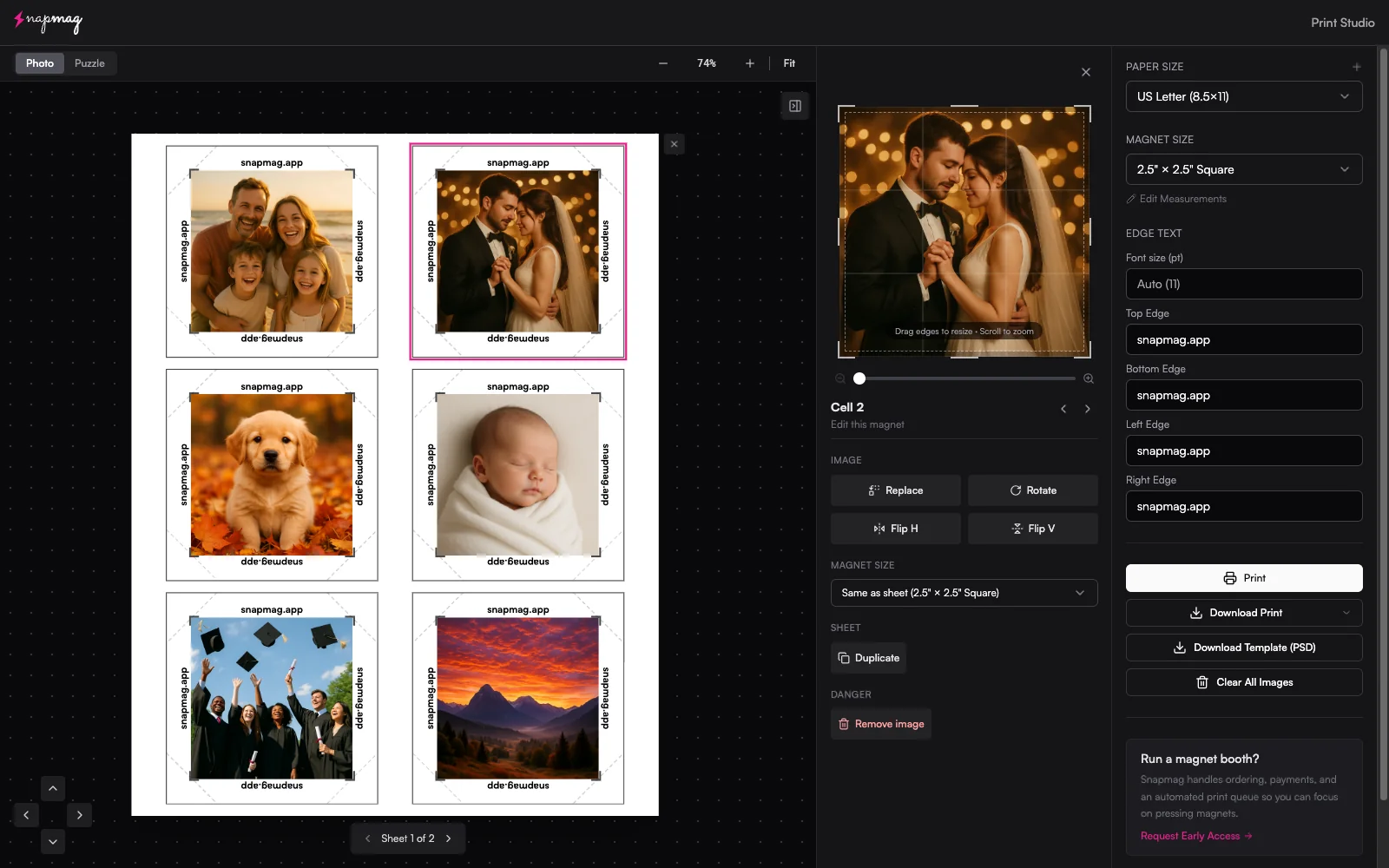
Drag, crop, arrange. The studio handles the bleed, the spacing, and the math so you can lay out a full sheet of mixed-size photo and puzzle magnets in under a minute. Free, in your browser, nothing uploaded.
No signup. No watermark. Photos never leave your browser.
What it does
Stop hand-laying photos in Canva between every customer.
If you sell photo magnets at events, the bottleneck isn't the printer — it's the layout. Cropping each photo, fitting them onto a sheet, leaving room for bleed and the cutter's tolerance. Print Studio collapses that into a drag-and-drop interface that knows what a magnet sheet should look like.
Mixed-size sheets
Pack 2×2, 2.5×2.5, 3×3 squares, 2×3 / 2.5×3.5 rectangles, and 1.5"–3" circles onto the same sheet. The packer fits as many as the paper allows, automatically.
Bleed & cut offsets built in
Every magnet size in the Vixie catalog has its outer-seam, artwork bleed, and cut offset configured. Drop the photo and the studio handles the cutter math.
Per-magnet crop & rotate
Drop a photo, drag to position, scale to fit. Crop is non-destructive — adjust mid-layout without re-uploading.
Edge text & captions
Add a date, an event name, or a custom caption around the magnet edge. Useful for festival vendors, weddings, and corporate events.
Puzzle grids
Switch to puzzle mode and pick a grid — 2×3, 3×3, 3×4, or 4×4. The studio splits one image across 2.5×2.5" magnet pieces with bleed on every internal cut.
Print-ready PDF export
One click. 300 DPI, correct paper size, magnet positions exact. Works with Canon, Epson, DNP, and any standard photo or sticker printer.
How it works
From folder of photos to print-ready sheet in 60 seconds.
- 1
Pick your paper and magnet size
Choose Letter, A4, A3, 13×19, or any of the supported sheet sizes. Pick a magnet — 2×2, 2.5×2.5, 3×3 squares, 2×3 or 2.5×3.5 rectangles, or 1.5"–3" circles. Or switch to puzzle mode and pick a grid. The studio shows the live cell layout before you drop a single photo.
- 2
Drop your photos
Drag photos from a folder straight onto the sheet. The studio places them into open slots and fills the sheet front-to-back. Reorder, rotate, or swap by dragging.
- 3
Crop and adjust
Click any photo to crop, scale, or rotate. The crop is non-destructive — you can keep tweaking after the magnet is placed. Add edge text, date stamps, or event captions if your run wants them.
- 4
Export print-ready PDF
One click. The PDF lands at 300 DPI with bleed, ready to send straight to your printer. Or print directly from the studio if you're plugged in locally.
First sheet not lining up with your press? That's a measurements issue, not a layout problem — every machine cuts at a slightly different measurement. The magnet size measurements guide walks every Edit Measurements field with annotated screenshots.
Who it's for
Vendors, photo booths, and Etsy sellers who actually press magnets.
The studio is the same engine that runs every Vixie event behind the scenes. We pulled it out, removed the signup wall, and shipped it free because designing in Canva between customers should not be a job.
Market & festival vendors
Show up Saturday morning, layouts pre-built. Mid-event re-orders take one drag.
Photo booth operators
Pack a sheet of 8 magnets between sets. The booth's SD card slots straight into the studio.
Etsy & online magnet sellers
Skip the per-order layout grind. Drop the customer's photo, export, fulfill.
The full platform
The studio is a free slice. The full Vixie handles the business.
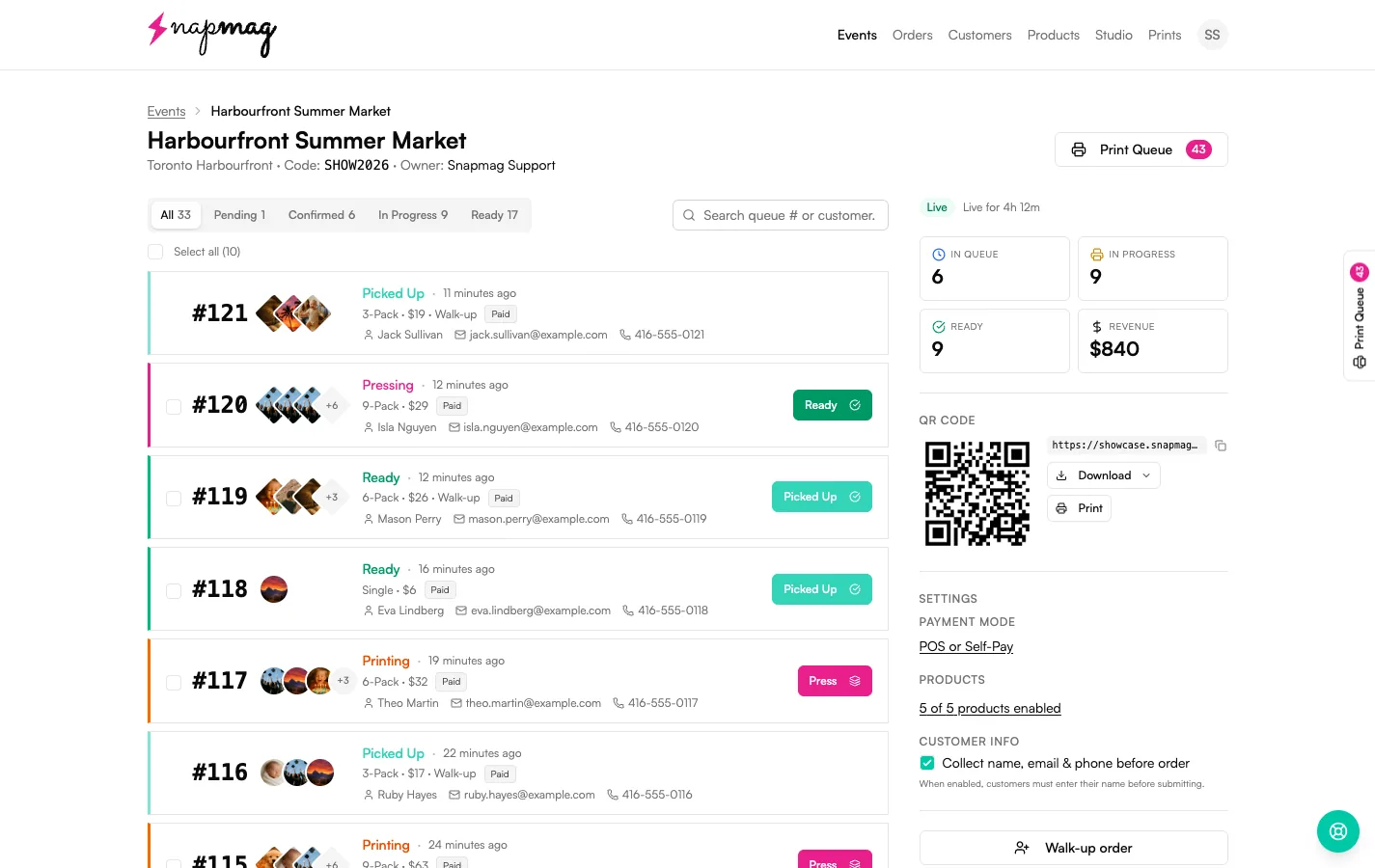
Print Studio is the layout engine. Vixie (the full platform) connects the layout to a customer-facing QR ordering flow, a paid order queue, and payments through Stripe, PayPal, or Square. Customers scan, pick photos, pay — and the studio auto-arranges every paid order into a print-ready sheet without you opening a design tool.
- Customers self-order from their own phone — no tablet shuffle
- Paid orders auto-arrange into print-ready sheets
- Live order board, batch printing, vendor subdomain
- $19/mo founder pricing, 7-day free trial, no credit card
Questions
Print Studio FAQ
Is the Print Studio actually free?+
What sheet sizes does it support?+
What magnet sizes can I lay out?+
Does it work for puzzle magnets?+
Can I save my templates?+
How is this different from Canva or Photoshop?+
What file format does it export?+
Keep going
Related reads.
Magnet size measurements
Annotated walkthrough of every Edit Measurements field, plus a diagnostic table for the test sheet.
Read more →ProductPuzzle magnets
2×3 to 4×4 grids that print as one sheet and snap apart into individual magnets.
Read more →Business guideStarting a photo magnet business
Gear, unit economics, pricing, and the booth playbook for new vendors.
Read more →Open the studio. Press magnets.
Free, in-browser, nothing uploaded. The same engine that runs every Vixie event — yours to use.
Open Print Studio